
AI Virtual Staging for Real Estate: The 2026 Realtor Playbook
When AI virtual staging wins vs traditional staging, MLS disclosure rules, and the per-listing economics that make it work for every vacant listing.
In this article
When AI virtual staging wins vs traditional staging, MLS disclosure rules, and the per-listing economics that make it work for every vacant listing.
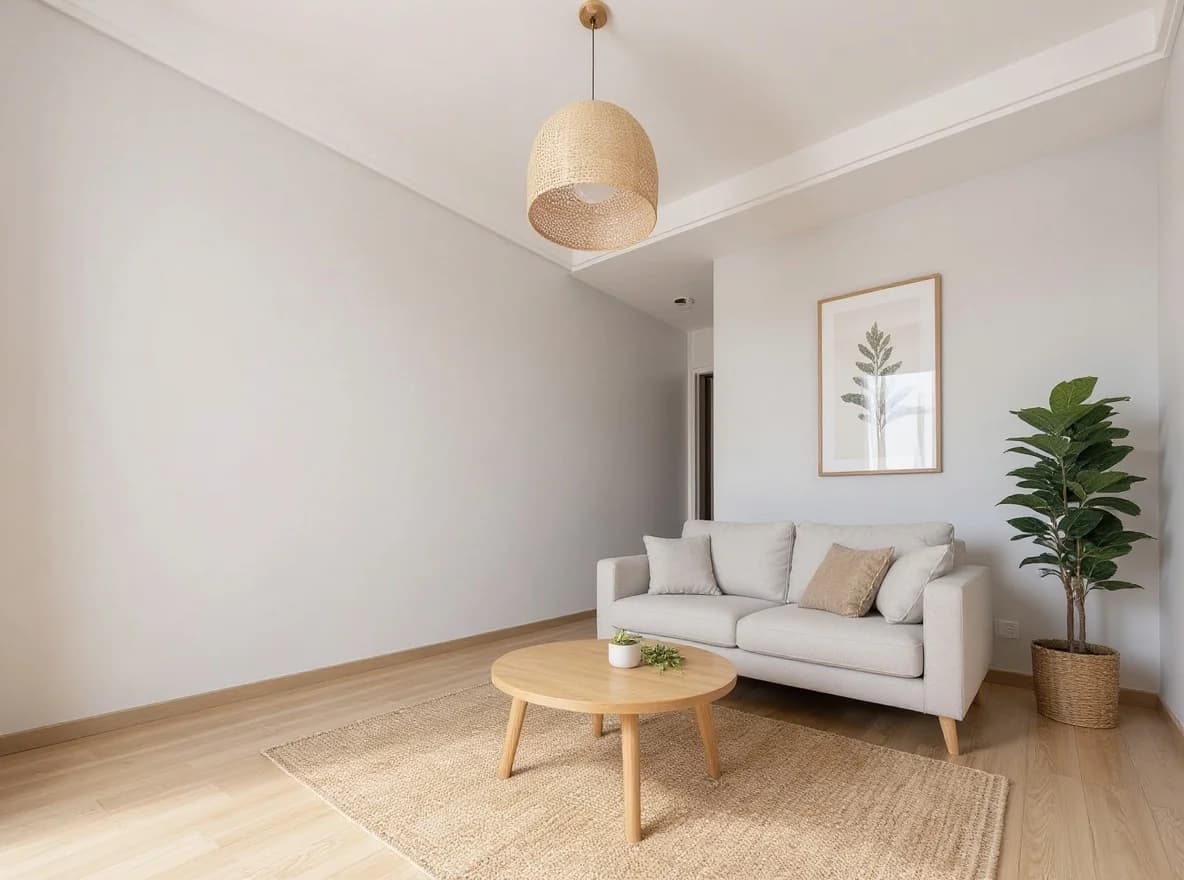
TL;DR. AI virtual staging takes an empty listing photo and outputs a furnished, MLS-ready image in roughly 60 seconds, at $15-50 per photo compared with $1,500-$3,500 per listing for traditional physical staging. For realtors and property managers, this changes the economics from "stage premium listings only" to "stage every vacant listing." If you want the practical 4-step workflow, see our virtual staging for real estate use case page — or upload an empty room photo directly at our virtual staging tool (free tier, no credit card).
What Is AI Virtual Staging?
AI virtual staging is a class of generative tools that read a photo of an empty room and produce a new image of the same room with believable furniture, art, rugs, and soft styling layered in. The walls, flooring, windows, and architectural features stay the same; the AI fills in the missing furnishings to match a chosen style — Modern minimal, Scandinavian, Mid-century, Luxury contemporary, Family-friendly, and a handful of others.
Technically, the engine is a diffusion model (same family that powers Midjourney and Flux image generation) wrapped in a structure-preservation layer that keeps the room's geometry, lighting, and wall surfaces intact. The AI's job is constrained: it cannot move walls, change the floor, or alter the windows. It can only add furnishings on top of the empty room, the same way a human stager would.
For real estate listings, this matters for one reason: the staged image is anchored to the actual property. Buyers seeing the staged photo on the MLS are not being shown a rendered fantasy; they are being shown the real room with furniture filled in. That keeps virtual staging on the right side of consumer-protection rules in most U.S. states.
Where it fits in the listing workflow
The natural place for AI virtual staging is the photography pass — after the property has been cleaned and emptied but before listing day. The realtor or their photographer captures the empty rooms as usual, and AI staging happens between the photo shoot and the MLS upload. There is no on-site staging crew, no rental furniture, no scheduling conflicts with the seller's move-out timeline. The same workflow that took 1-2 weeks of physical staging compresses to an afternoon at a laptop.
The second place AI staging earns its keep is the re-list. When a listing has been on the market for 30-60 days with declining showings, a refreshed visual presentation can re-trigger algorithmic placement on Zillow and Realtor.com. Re-staging an existing listing with a different style — going from "Modern minimal" to "Family-friendly" to broaden buyer appeal — costs the price of generating a few new photos, not the price of bringing the staging crew back in.
Why Realtors Switch to AI Staging
Three numbers explain the shift.
Cost. Traditional physical staging runs $1,500-$3,500 for a typical three-bedroom listing in most U.S. metros, with the high end common in coastal markets. AI virtual staging costs $15-50 per generated photo, or roughly $50-200 for a complete listing covered across the main rooms. That is a 20-30x cost reduction per listing.
Time. Physical staging requires a site visit by the staging company (typically 1-3 days out from booking), a half-day or full-day install, the listing photo shoot scheduled after install, and a de-stage at sale close — minimum 1-2 weeks of calendar time. AI staging runs in under a minute per photo, with the entire listing typically completed in a single afternoon at the realtor's desk.
Coverage. Because cost and time are no longer the bottleneck, AI staging makes economic sense on every vacant listing, not just the premium ones. The agent who used to stage only their $800K+ listings can now stage their $250K starter homes the same way — which compounds over a year of listings.
The honest caveat: AI staging only fits the listing-photography step. It does not replace the open-house experience for properties at the high end where buyers physically walk through and expect to see real furniture. For the $2M-plus segment where staging doubles as a buyer-experience tool, physical staging still wins.
Step-by-Step: From Empty Photo to MLS-Ready Image
The four steps below cover the practical workflow.
1. Photograph the empty room
Shoot at chest-to-eye height with the camera held square to the longest wall. Natural daylight beats flash or lamp light — open blinds, kill the overhead lights, shoot at midday if possible. A standard listing photo is enough; you do not need a wide-angle DSLR setup. Make sure the floor and ceiling are visible in the frame — the AI uses room boundaries to size furniture correctly.
The photos that work best are slightly boring: even lighting, square perspective, full room context. The dramatic angled shots that look great on a finished listing actually fight the AI, because the perspective distortion gets propagated into the staged version.
2. Pick a furniture style and target buyer
The single biggest variable is matching the staging style to the likely buyer. A 1-bedroom downtown condo stages better in Modern minimal or Mid-century to read as "young professional." A 4-bedroom suburban listing stages better in Family-friendly or Scandinavian warm to read as "growing family." A high-end luxury listing stages in Luxury contemporary, with attention to scale: a sofa that looks right in a 1,500 sqft starter home reads as undersized in a 4,000 sqft estate.
Most AI staging tools let you pick a style preset directly. The detailed prompt — "low-slung sectional, large oversized lamp on the left, abstract wall art over the sofa" — is optional and usually only helpful when you want to control a specific element.
3. Generate (~60 seconds)
Upload the empty photo, pick the style, hit generate. The AI preserves the wall colors, flooring, windows, and architectural features — it only adds furniture, art, rugs, and soft styling. Each generation takes under a minute.
Most agents generate 2-3 variations per room and pick the best one. The cost-per-iteration is low enough that there is no reason to ship the first result if a second pass would land better.
4. Export and publish to MLS
Download at listing resolution and upload directly to your MLS. Most listing platforms accept standard JPG or PNG at 2000+ pixels on the long edge, which all modern AI staging tools deliver.
Critically: add a "Virtually Staged" disclosure to the listing copy. Most state real estate boards require this; it is also a National Association of Realtors best practice. We cover the specific rules in the next section.
The MLS Disclosure Question
This is the part most realtors get wrong, and it is also the part that triggers compliance complaints.
The general rule: virtually staged photos must be labeled. The exact wording varies by state and MLS, but the consistent thread is that any photo where the displayed furniture is not actually in the room must be marked. The label can be a watermark on the photo, a tag in the listing copy ("Photos 1-4: virtually staged"), or both. What it cannot be is invisible.
A few specifics:
- NAR Code of Ethics, Article 12 requires real estate professionals to present "a true picture" in their advertising. The NAR has issued guidance specifically naming virtual staging as a context where disclosure is required.
- California, Texas, Florida, New York, Illinois real estate commissions have all issued bulletins clarifying that virtually staged photos must be labeled. Penalties for non-disclosure include license sanctions and consumer fraud actions.
- MLS local rules vary. Bright MLS, Stellar MLS, CRMLS, REIN, and others publish their own disclosure standards. Check your local MLS handbook — they are typically a 1-2 page document.
The practical implementation is simple: in any listing copy that uses virtually staged photos, include a one-liner ("Photos shown are virtually staged. Property is vacant.") and either watermark each staged image in the corner or list the staged photo numbers explicitly.
The reason this matters beyond compliance: buyers feel deceived when they tour an empty house after seeing a fully-furnished MLS listing. The "virtually staged" label removes that surprise. A well-disclosed listing converts buyers; an undisclosed one generates complaints and Zillow reviews that follow the agent for years.
AI Staging vs Traditional Staging: When Each Wins
A short decision matrix.
Use AI staging when:
- The listing is under $1.5M and the staging budget is the bottleneck on whether to stage at all.
- The seller's move-out timeline is tight and physical staging crews cannot install before listing day.
- You are re-listing a stale property and want to refresh photos without re-booking a stager.
- The property is in a market where a "virtually staged" disclosure is standard practice and buyers expect it.
- You want to A/B test which staging style attracts more inquiries before committing physical furniture.
Use traditional staging when:
- The listing is $2M+ and physical open-house presence is part of the buyer experience.
- The property has structural quirks (sunken living rooms, oddly-proportioned spaces) that need a stager's eye to make work in three dimensions, not just two.
- Local market norms still favor in-person staging — coastal luxury markets, ultra-prime city centers.
- You expect heavy buyer foot traffic during showings and the empty house will read as cold or unfinished.
The hybrid play, common in 2026, is to physically stage the main living room for showings and virtually stage the bedrooms for MLS. That delivers the in-person experience where it matters most and saves 50-70% on the staging budget.
What AI Virtual Staging Cannot Do
The honest limitations:
- AI cannot fix structural issues. Water stains, peeling paint, damaged flooring, or visible wall cracks remain in the staged image. The AI adds furniture on top of the existing room — it does not retouch the underlying photo. Fix or repaint first, photograph second, stage third.
- Specific furniture brands are not modeled. "West Elm Andes sofa," "Restoration Hardware Cloud sectional," "CB2 Hoekman dining table" — the AI produces a plausible match within the style family, not the exact SKU. If you need a specific brand for a tied-in marketing partnership, AI staging will not deliver it.
- Best for fully vacant rooms. Partially-furnished or occupied spaces give the AI conflicting layout signals. Results vary unpredictably when there is existing furniture for the AI to negotiate around. De-stage physically, then virtually stage.
- Heavily textured walls can confuse the engine. Exposed brick, painted murals, or decorative wall treatments sometimes cause the AI to add furniture that clashes with the existing surface. A test render before committing usually surfaces this.
- AI staging is not photography retouching. If the underlying empty-room photo is poorly lit, badly composed, or distorted by a wide-angle lens, AI staging will not save it. Good staging starts with a good empty photo.
Adjacent Workflows Worth Knowing
For property managers thinking about renovation before staging, see our sketch to render AI workflow — useful when you are deciding on a renovation direction before committing to the build, then staging the renovated unit.
A deeper per-listing cost breakdown — AI vs traditional staging across a full year of listings — is coming as a separate post. Until then, see the virtual staging product page for current per-photo economics on Pro and Studio plans.
Try It on Your Next Vacant Listing
The fastest way to see if AI staging fits your workflow is to run a single listing through the tool. Take an empty-room photo from a recent vacant listing, upload it to the virtual staging generator, pick a style, and see the result in 60 seconds. The free tier requires no credit card. If the output is publishable on your MLS, you have your answer.
For the granular 4-step workflow with input tips, honest limitations, and example before/after pairs, see the virtual staging for real estate use case page.
More Posts
More Posts

Sketch to Render AI: How Architects Turn Hand Drawings into Photorealistic Renders in 2026
A practical guide to AI sketch-to-render for architects, students, and designers. What it does, how it fits real workflows, and where it still falls short.
Architecture Presentation Board: A Complete Guide (Layout, Examples + AI)
A complete guide to designing an architecture presentation board — essential elements, layout and hierarchy, competition vs client boards, and how to speed it up with AI.

How to Make an Interior Design Mood Board (Step-by-Step + AI Shortcut)
A practical, step-by-step guide to building an interior design mood board — by hand or with an AI mood board creator — and turning it into a client-ready presentation.
Get the next product and workflow notes in your inbox
Newsletter
Join the community
Subscribe to our newsletter for the latest news and updates